Is Your Job Profit Real? Why Transport Profit Must Be Worked Out Before VAT

A transporter invoices a customer TZS 18,500,000 for a round trip to Lubumbashi, plus 18% VAT: TZS 21,830,000 in total. The diesel cost TZS 4,104,900. What did the job make?
If you answered TZS 17,725,100, you counted the VAT as income, and you are not alone: many job sheets and spreadsheets do exactly that. The real answer is TZS 14,395,100. The other TZS 3,330,000 was never yours; it is owed to TRA.

Why the VAT is not income
When you raise a VAT invoice, you collect VAT on behalf of the Tanzania Revenue Authority. In the books, the invoice posts the income to Revenue and the VAT to VAT Payable, a liability you pay to TRA with your monthly return. Your profit and loss statement never counts it as income.
The same is true on the cost side. When a fuel station's receipt shows VAT and you are VAT-registered, you claim that VAT back as input VAT. The cost of the diesel is the amount before VAT.
So if a job's profit counts the VAT on the invoice as income, it is overstated by the full VAT, 18% of the price. Across a year of trips, that is the difference between a business that looks comfortable and one that is not.
What eSecured ERP shows now
Job and trip profit now follow the books: income and costs before VAT, with the amounts including VAT shown alongside, so nothing is hidden.
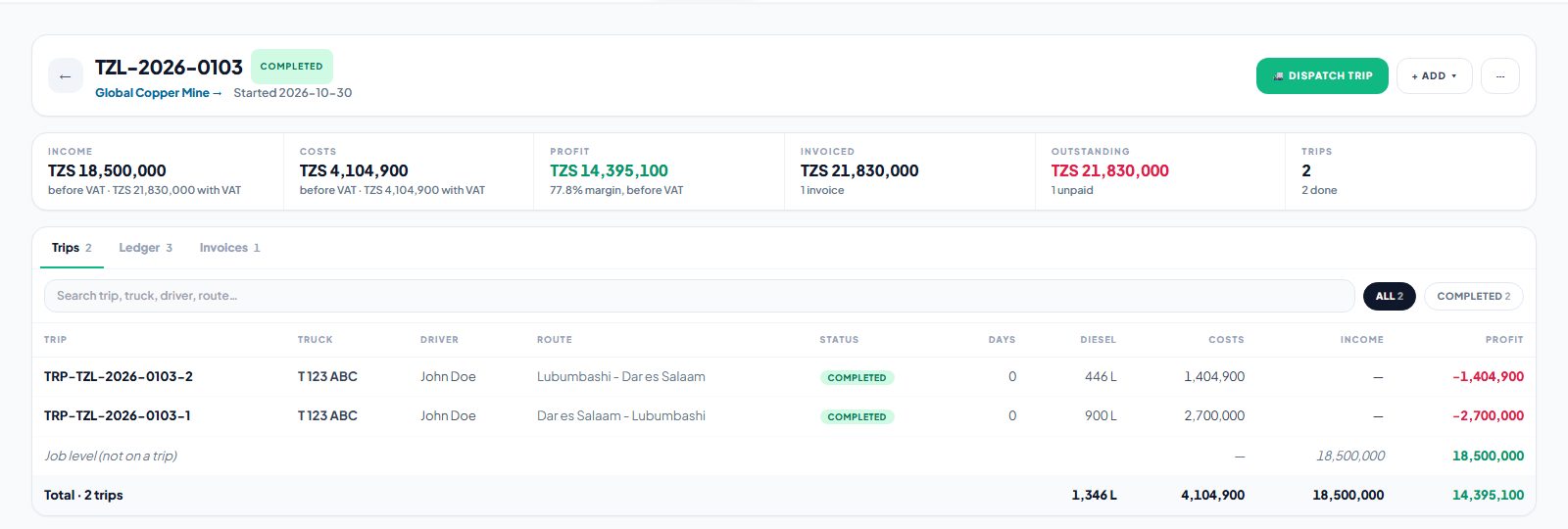
On the job page, Income and Costs show the amount before VAT, with the amount including VAT underneath, and Profit and margin are worked out before VAT. Invoiced and Outstanding still include VAT, because that is what the customer actually owes you.
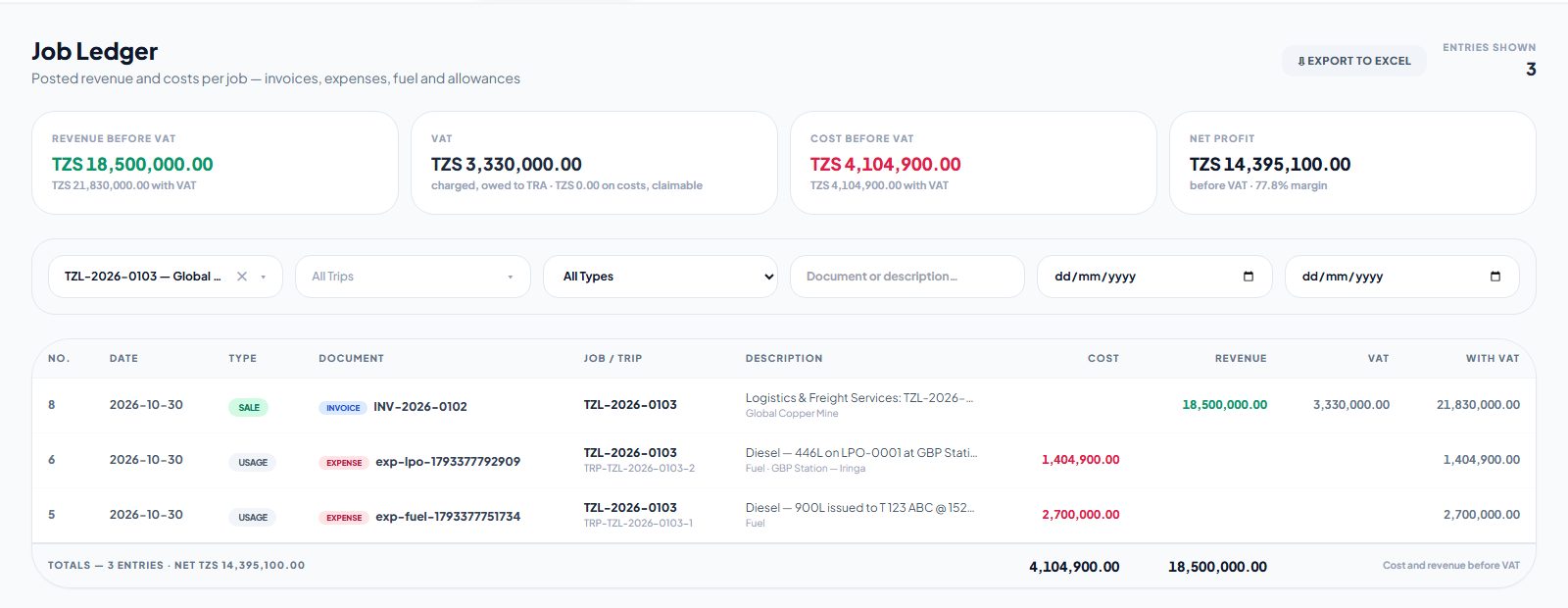
The Job Ledger shows the whole picture for any job or set of jobs:
- Revenue before VAT, with the amount including VAT under it
- VAT charged on those invoices and owed to TRA, and the VAT on costs that you can claim back
- Cost before VAT
- Net Profit before VAT, with its margin
Every line also shows its own VAT and the amount with VAT, exactly as on the document, and the Excel export has the same columns.
The same figures are used on the trip page, the trips and jobs lists, the main dashboard and the Fleet Report, so every screen agrees with every other screen, and with the General Ledger.
Zero-rated and exempt invoices
Not every freight invoice carries VAT. Transit freight to a neighbouring country is generally zero-rated, and some services are exempt. Profit is based on the VAT actually charged on each invoice, so an invoice with no VAT counts in full. Nothing is deducted that was never collected.
What to check in your own business
- Compare your margins. If your old job reports counted VAT as income, today's profit figures will be lower, and more accurate. A job that looked like 90% margin may really be 78%.
- Price with the right number. Use income before VAT when you judge whether a route or customer is worth the trip.
- Keep fuel receipts with VAT. Tick "The receipt shows VAT" when you confirm a fill, so the VAT is claimed back and the cost is right.
Related reading
- Job Ledger documentation →: why profit is before VAT, and every column
- Logistics →: the job and trip pages
- Fuel management: Kibali, LPOs and the Fuel Ledger →: where the diesel cost comes from